Routing rules
Send requests to the right model based on headers, team, budget use or personal data, with weights and fallbacks.
On this page
Routing rules decide where a request goes based on what the request looks like: a header, the team, how much of the budget is used, whether it contains personal data. They sit in front of the existing model aliases (see Routes in the admin UI) and are modelled on Bifrost routing rules.
Status. Rules are stored, compiled, applied to live requests and managed through the admin API and the admin UI (Models & routing > Routing rules).
Worked examples
Both examples are global rules created under Models & routing > Routing rules (gateway-admin) with the demo data. Your applications keep asking for the same model name; the rules decide where the request goes. The screenshots were taken from the real UI.
Example 1: use another model if the main model doesn't answer
Ask for ume/chat-advanced. If every provider behind it fails or times out, try ume/chat-standard instead.
| Field | Value |
|---|---|
| Name | Advanced model with fallback |
| Applies to | Global |
| Condition | model == "ume/chat-advanced" |
| Send to | ume/chat-advanced (weight 1) |
| Fallbacks | 1. ume/chat-standard |
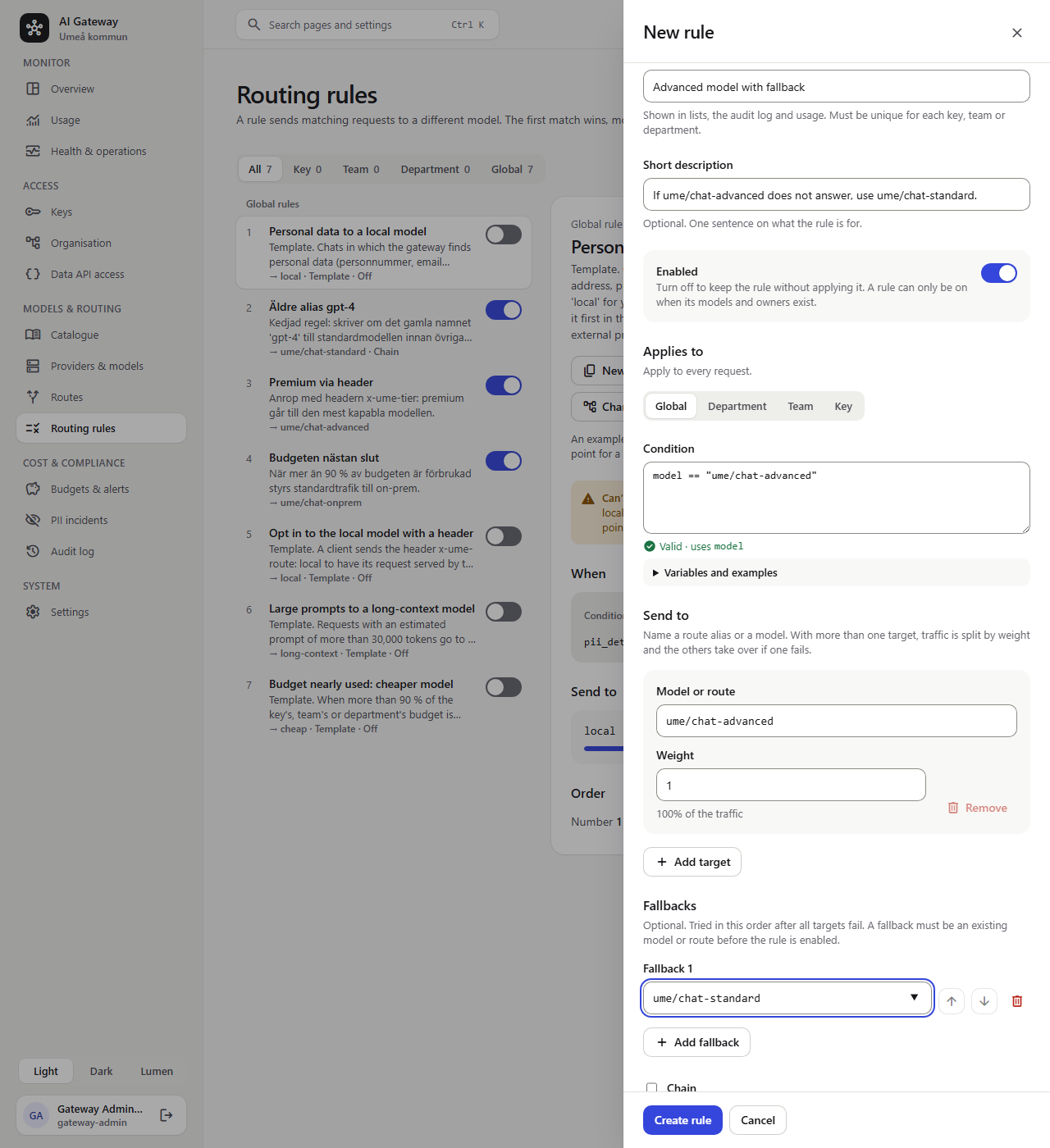
After Create rule the rule shows up in the list, in the order the gateway checks it:
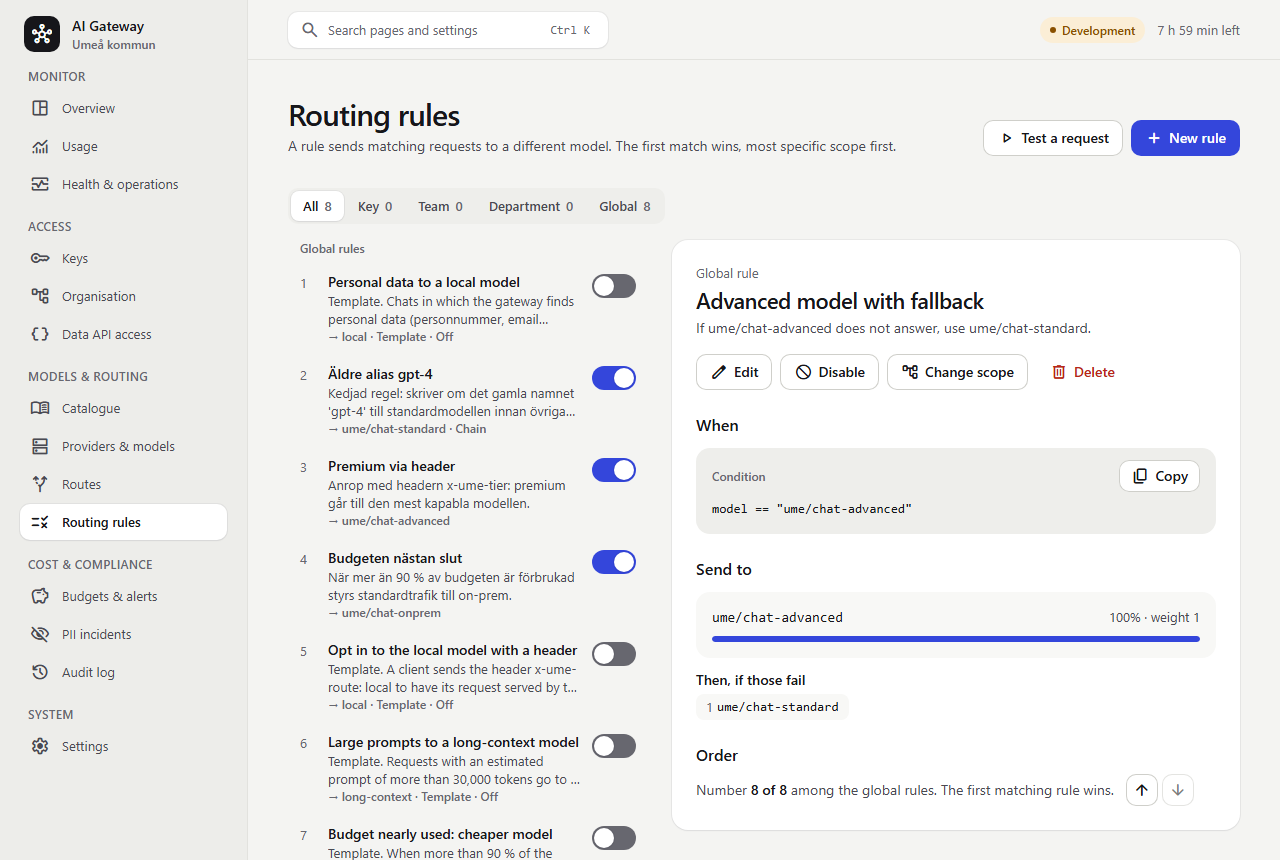
How it behaves: the target is tried first (with its own provider order from the route). The fallbacks are tried only when the call fails
in a way that can be retried (a timeout, 408, 409, 429, a 5xx or a provider configuration error), and never after the response has started
streaming. Other client errors (such as 400) are returned as they are. The response header x-ume-fallbacks counts the extra attempts and
x-ume-rule names the rule. Providers whose circuit breaker is open are moved last, so the fallback is tried before a known-broken primary.
Only transient failures (timeouts, connection errors, 408, 409, 429, 5xx) count toward the circuit breaker; a provider configuration
error (such as an upstream 401, 403 or 404) falls back to the next provider without opening the circuit.
A failure that says when to come back (Retry-After or retry-after-ms, as Azure OpenAI and OpenAI send with a 429) puts that
one model deployment on cooldown for that long instead, shared by all gateway instances: it goes last, like an open circuit,
so requests stop paying a wasted round trip to a deployment that is out of quota. A cooldown is a quota, not a health problem,
so it does not count toward the provider's circuit, and the provider's other deployments are unaffected. The longest cooldown
is CircuitBreaker:MaxRetryAfter (default 5 minutes, at most 1 hour; 00:00:00 ignores Retry-After).
The last candidate is also retried once after a passing failure (a connection error or 502/503/504 without
Retry-After; not a timeout, a 429 or a client error), after a short jittered delay: a route with a single target no longer
fails on one network blip. Earlier candidates are not retried, the next candidate is their retry. x-ume-fallbacks and the
usage record count every extra attempt. Settings: Gateway:Retry:MaxRetries (default 1, 0–3; 0 turns it off) and
Gateway:Retry:BaseDelayMs (default 250, doubled per retry).
A model whose context window (set on the model, or found by discovery) the prompt clearly exceeds is skipped, so a route
can send long prompts to a larger fallback model; when no candidate is large enough the request is refused with 400
context_length_exceeded before anything is sent or reserved. The prompt is estimated from the request size (about 4
bytes per token, 10 % margin), so a request close to the limit can still be refused by the provider.
Example 2 (advanced): chats with personal data go to an on-prem model
When the gateway finds personal data in a chat (a personnummer, an email address, a phone number, an IBAN), send the request to
ume/chat-onprem instead of an EU or external provider.
| Field | Value |
|---|---|
| Name | Personal data stays on-prem |
| Applies to | Global |
| Condition | pii_detected && endpoint == "chat_completions" |
| Send to | ume/chat-onprem |
| Fallbacks | none, on purpose |
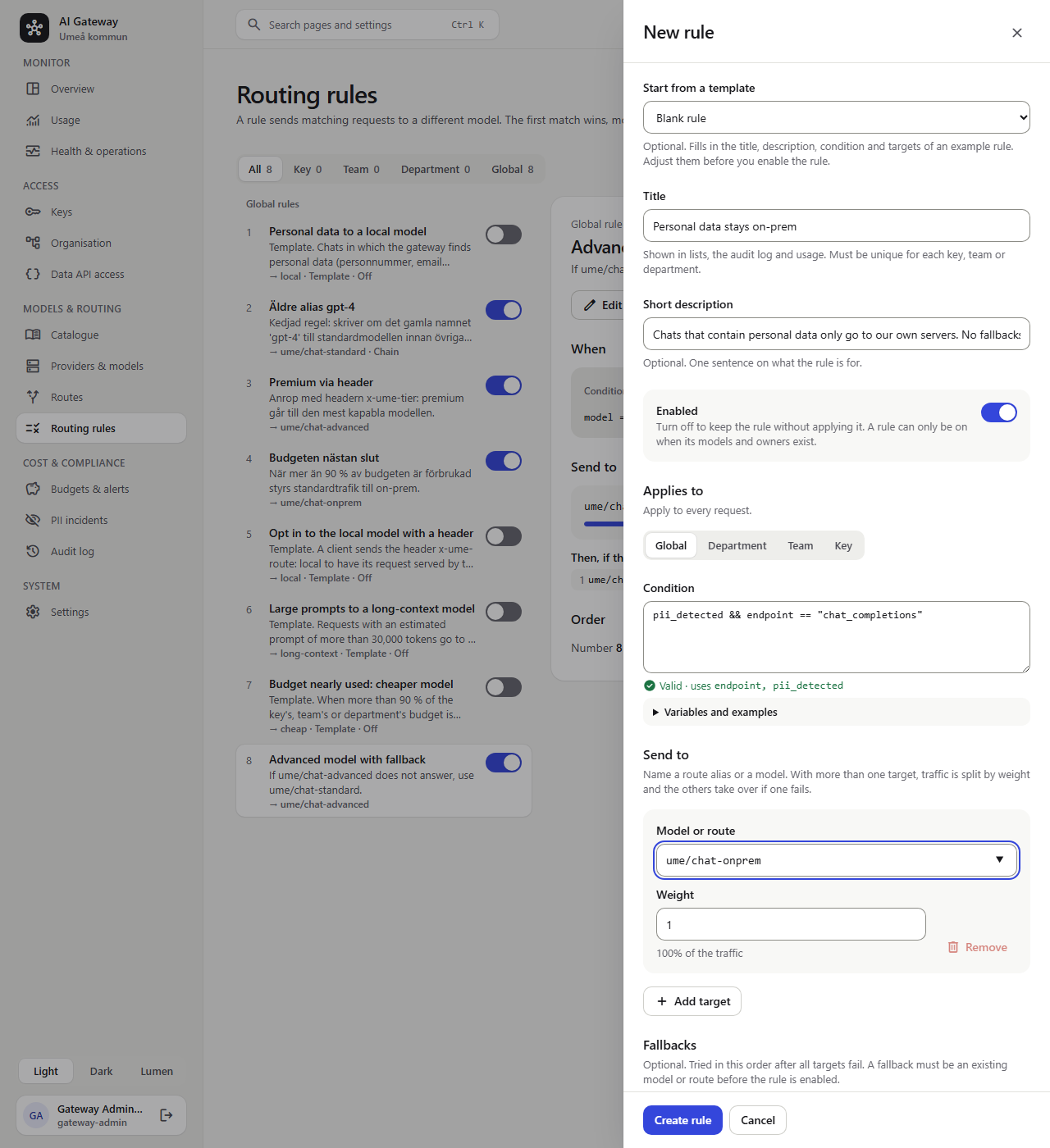
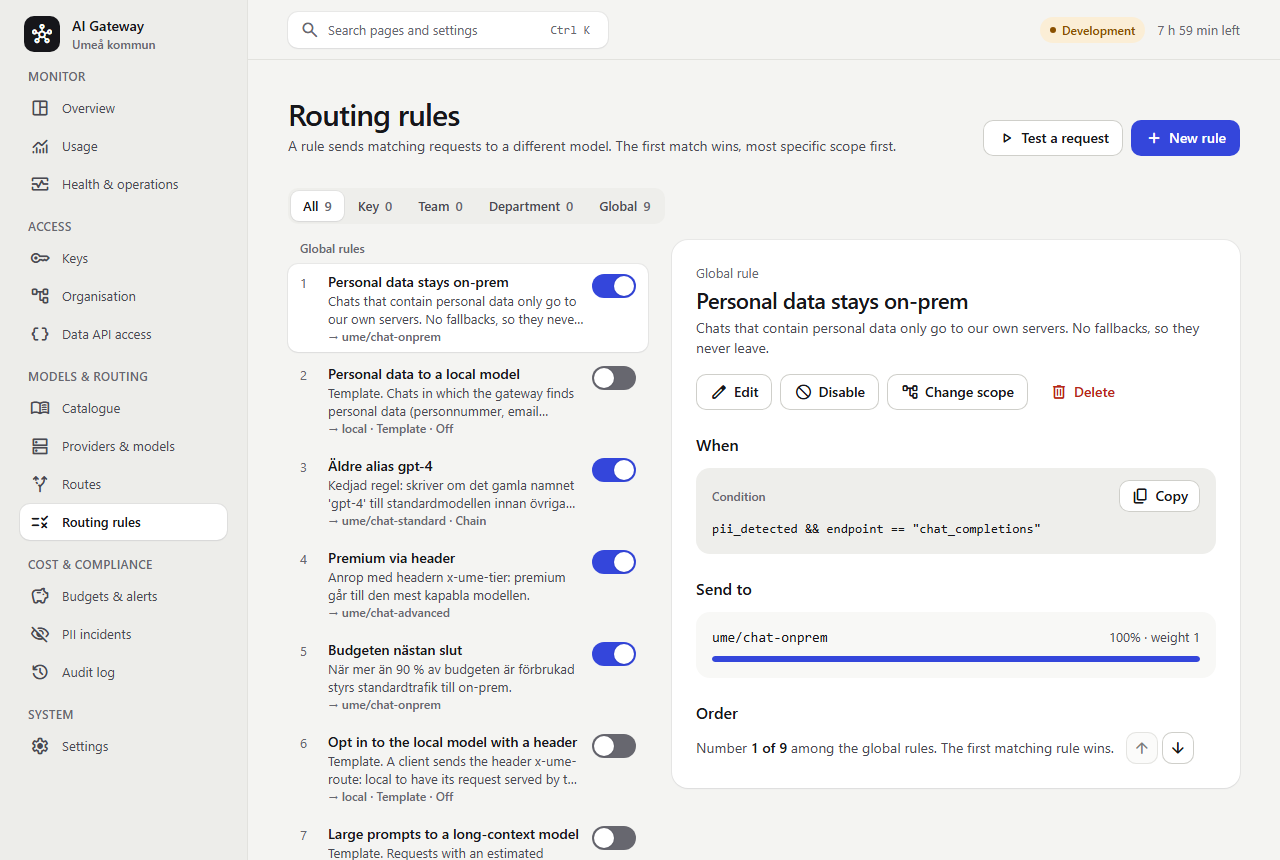
Three things make this safe:
- Order matters: the first matching rule wins. New rules are added last, so use Check earlier (the arrow buttons next to Order) until the
rule is number 1. Otherwise a request with personal data that also matches Premium via header would go to
ume/chat-advanced. - No fallbacks. If the on-prem model is down the call fails with
503 no_eligible_provideror502 all_providers_failedinstead of quietly sending the chat to an EU or external provider. Add a fallback only if it is also on-prem. - Rules never widen access. A key's allowed providers and residencies are applied after the rules, so the rule cannot send a chat anywhere the key may not go.
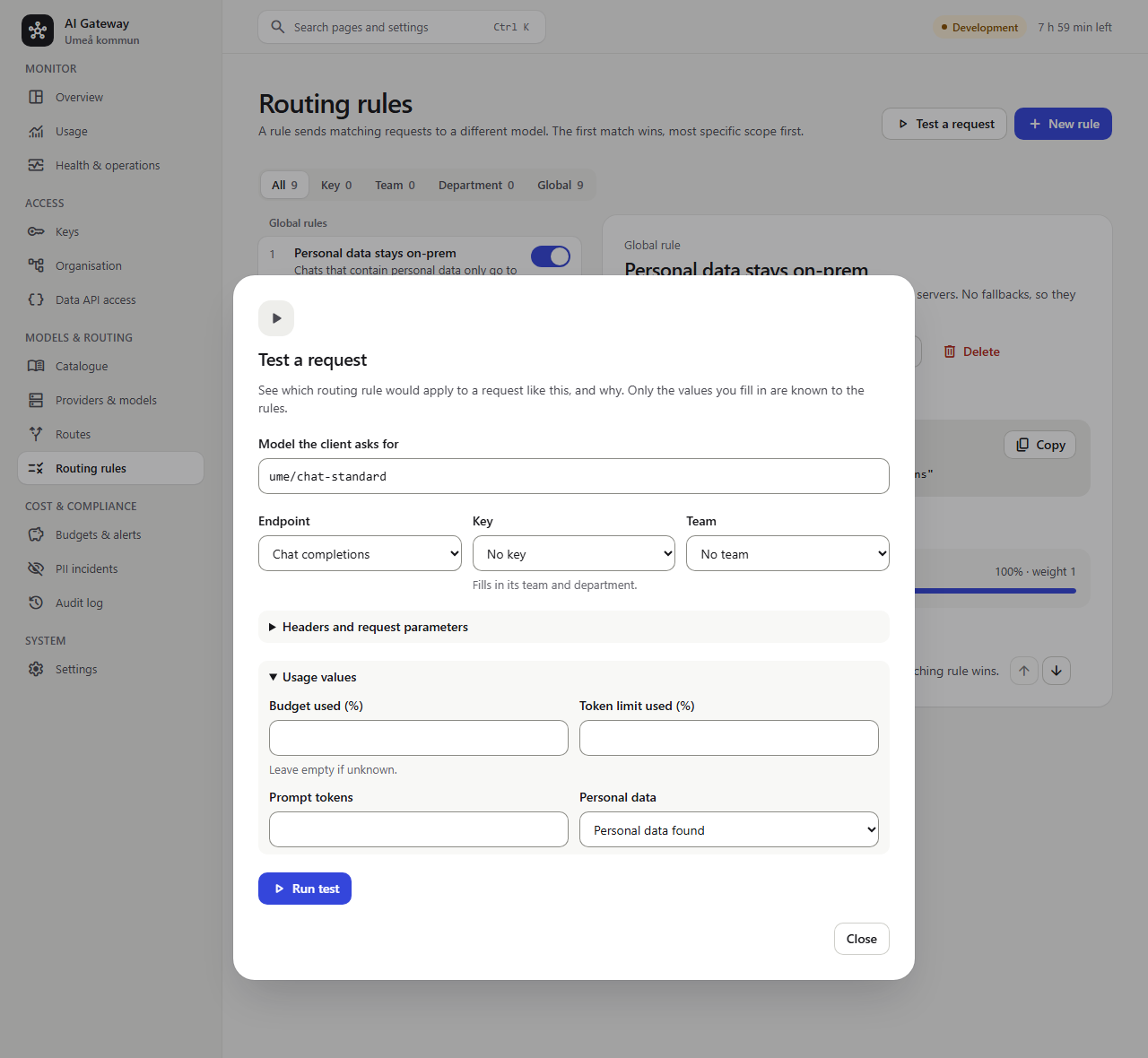
Check the rule before relying on it with Test a request: ask for ume/chat-standard, open Usage values and set Personal data to
Personal data found:
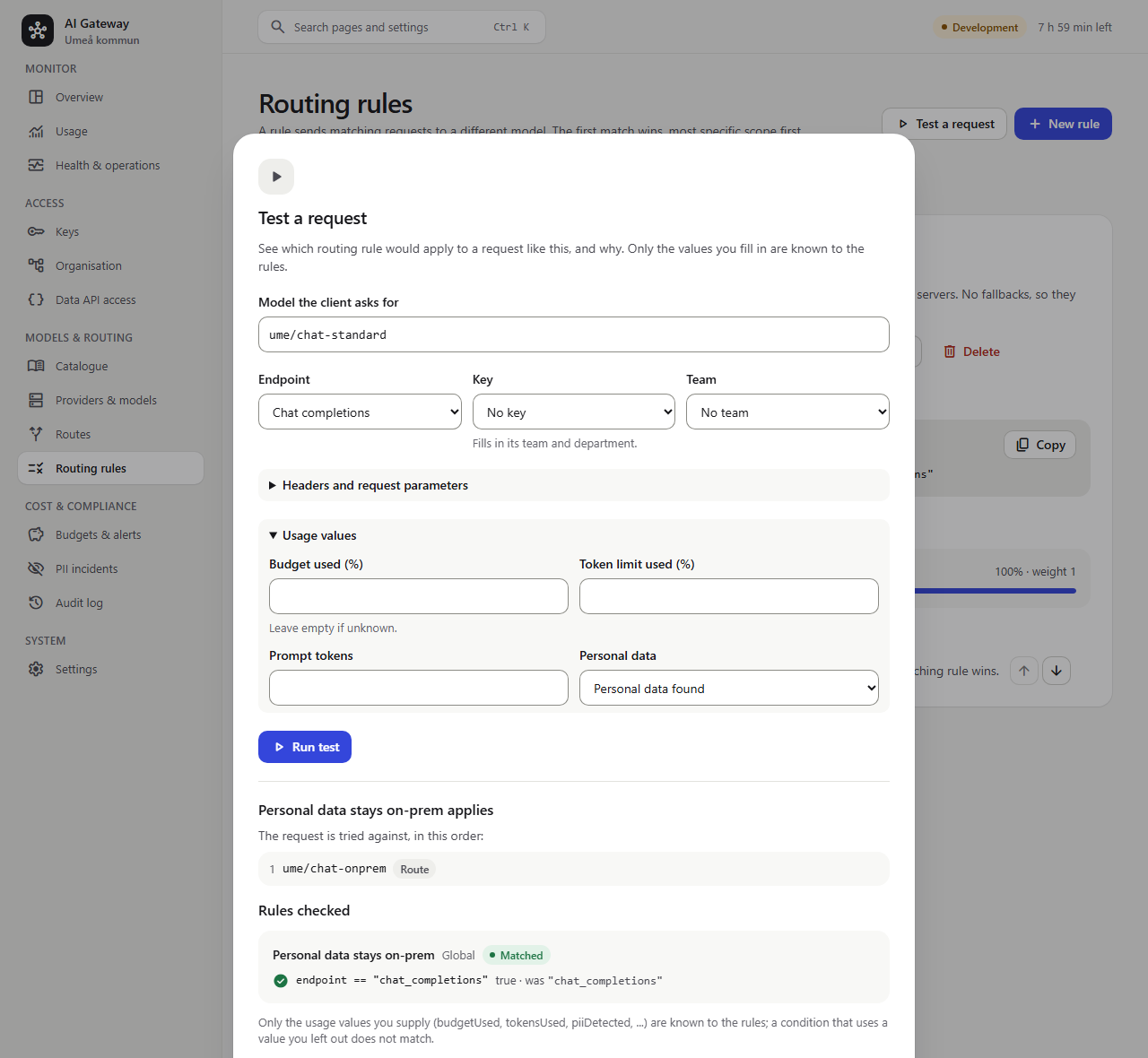
The result says which rule applies, which models the request is tried against and why each condition was true or false:
On the real gateway (checked with the demo data and a synthetic personnummer): a chat containing 19121212-1212 was served by
fake-onprem (x-ume-residency: OnPrem, x-ume-rule set), while a chat without personal data went to the EU provider as before.
Notes:
pii_detectedis evaluated for every request that a rule asks about it, whatever the key's PII policy (Off, Allow, Redact), so the rule works even for keys that have no PII policy. If the key's policy is Block, the request is rejected before the rules run.- If you only need "personal data stays on-prem" for specific keys, the key's PII policy Reroute to on-prem does the same without a rule.
Use a rule when you want it per team or department, per model, with a chosen on-prem model, or combined with other conditions
(for example
pii_detected && department_name == "Individ- och familjeomsorgen"). - Detection covers Swedish personnummer and samordningsnummer, email addresses, Swedish phone numbers and IBANs (not bankgiro numbers); see Personal data (PII) for the formats. It is a safety net, not a guarantee that no personal data reaches a provider.
To regenerate the screenshots after a UI change, start the test stack (.\scripts\Start-E2E.ps1) and run
npx playwright test -c playwright.docs.config.ts screenshots in tests\e2e. The script builds the two rules through the UI, so it
changes the (disposable) test database only.
Templates: example rules to start from
Every installation gets four template rules, created once by the database migration and switched off. They show how typical rules are written; nothing happens until an administrator switches one on. Each is marked Template in the list.
| Template | Condition | Sends to |
|---|---|---|
| Personal data to a local model | pii_detected && endpoint == "chat_completions" | local (no fallbacks, checked first among global rules) |
| Opt in to the local model with a header | headers["x-ume-route"] == "local" | local |
| Large prompts to a long-context model | prompt_tokens > 30000 | long-context |
| Budget nearly used: cheaper model | budget_used > 90 | cheap |
The targets are placeholder route aliases. A disabled rule may name a model or route that does not exist yet, but it
cannot be switched on until it does: the switch answers "Regeln kan inte aktiveras. Okänd modell eller alias: local. …".
Either create a route alias with that name under Models & routing > Routes (for example local pointing at your on-prem
model), or edit the rule to point at an existing one, then switch it on.
Two ways to use a template:
- Adopt it: edit it (or just switch it on). It becomes an ordinary rule and loses the Template mark.
- Copy it: New rule from template (or Start from a template in the new-rule form) fills a new rule with the template's title, description, condition and targets, for example to apply it to a few keys only. The template stays as it is.
A deleted template is not created again. Templates are not part of the configuration export (every installation has them), and the migration skips a template if a global rule with the same name already exists.
How a rule works
| Field | Meaning |
|---|---|
Title (name) | Shown in lists, the audit log and usage. Unique among global rules, and among the rules of one scope that share a key, team or department |
| Description | Optional short description, shown under the title in the list |
| Enabled | The on/off switch. Disabled rules are validated but never evaluated. Switching a rule on requires its models and owners to exist |
| Scope | VirtualKey, Team, Department or Global |
Owners (scopeIds) | For a non-global rule: one or more keys, teams or departments of that kind. The rule is shared: it applies to each of them, and changing it changes it for all |
| Priority | Lower is checked first within a scope (default 0) |
| Condition | An expression, see below. Empty = always matches |
| Targets | One or more model names (a route alias such as ume/chat-advanced, or a deployment such as azure-swc/gpt-4o-mini) with a relative weight (1-1,000,000) |
| Fallbacks | Further models tried, in order, after all targets |
| Chain | Route the rewritten model through the rules again |
Evaluation order
- Scopes are checked most specific first: key, team, department, global. Only the rules whose owners include the request's key (or a key it replaced), its team or its department take part.
- Within a scope, by ascending priority, then by name. The order is kept per scope, not per owner, so a rule shared by several teams has the same place relative to the other team rules for each of them.
- The first rule whose condition is true wins. Nothing else is evaluated.
- If no rule matches, the request is routed exactly as before.
The matching rule's targets are put in weighted-random order (so a 70/30 split sends about 70 % of
requests to the first target), the remaining targets act as failover, and the fallbacks follow.
Route targets of the same priority are ordered the same way. With Gateway:LoadBalancing=LeastLoaded
(Gateway__LoadBalancing) the first of them is instead the better of two drawn by weight ("power of two choices"):
each gateway instance keeps moving averages of every deployment's latency and success and counts its requests in
flight, and prefers the faster, healthier, less busy one. Use it for the same model on several regions or GPU servers;
keep the default Weighted when the shares must follow the weights exactly (a 90/10 canary), because the scores move
traffic away from the weights.
A request with the header x-ume-session (any id of the conversation, at most 200 characters), or OpenAI's
prompt_cache_key body parameter, goes first to the same target of each priority every time (rendezvous hashing, by
weight), whatever the balancing mode, so a vLLM or Ollama server's prompt (prefix) cache is reused across the turns of a
conversation. Sessions are spread over the targets by weight; when a target goes away only its sessions move.
Duplicates are removed. The existing failover behaviour is unchanged: transient and provider-configuration failures
move to the next candidate, and nothing is retried once streaming has started.
Chaining
With Chain on, the rule's result becomes the new model and all rules are checked again. Use it to
normalise names before routing, for example gpt-4 to ume/chat-standard and then a tier rule on
ume/chat-standard. Chaining stops when no rule matches, a rule without Chain matches, the model
does not change, a model repeats, or after 8 steps. A rule is applied at most once per request. The
last matching rule decides the final models and fallbacks.
Where rules run in a request
Authenticate, parse, then the requested model name is checked (known name: the key's model and provider allow-lists and endpoint compatibility, as always). Then rate limit and the PII policy run. Then the rules run, followed by candidate selection (provider allow-list, residency, PII restriction, circuit state, streaming capability), budget reservation and the provider call with failover. A request that is rejected earlier (bad key, rate limit, PII block) never reaches the rules.
The models a rule chose are tried in order: the first target's own alias targets (by priority and weight), then the other targets, then the fallbacks. Providers whose circuit is open go last across all of them, so a healthy fallback model is tried before a failing primary is retried.
No silent return to the requested model. If a rule matched and none of its models can serve the request (all
excluded by the key's restrictions, or the names do not exist or have the wrong kind), the request fails with
503 no_eligible_provider. To fall back to what the client asked for, add that model as an explicit fallback.
Names only a rule knows. A client may use a legacy name that does not exist in the catalogue if a rule rewrites
it (for example gpt-4). Such a request is checked against the key's model allow-list using the first model in the
rule chain that exists; if no rule matches, it is 404 model_not_found, just later in the pipeline.
Rules never widen access
Rules only choose among destinations. A key's allowed providers, allowed residencies, the PII on-prem restriction, endpoint compatibility and disabled or drained providers are applied after the rules, so a rule cannot send a request somewhere the key may not go. A key's model allow-list applies to the model the client asks for.
Managing rules in the admin UI
Open Models & routing > Routing rules (gateway-admin only).
- List. Rules are grouped by scope in the order the gateway checks them (key, team, department, global) and numbered
in checking order. Each shows its title, its short description, a line that says where it sends traffic, who it applies to
and anything unusual (Template, Chain, Off, Needs an owner, Ignored: invalid), and an on/off switch
(a keyboard-operable
role="switch"). The switch only moves when the server accepts the change; if switching a rule on is refused (for example a template whose route does not exist yet) it stays off and the reason is shown above the list. Filter by scope, or show only the rules that need an owner. - Detail. The selected rule's owners, condition, its targets with each one's share of the traffic, its fallbacks and its place in the order, and a warning listing models that do not exist. You can edit, enable or disable, move it earlier or later (buttons, keyboard accessible), change its owners or scope, delete it, and for a template create a new rule from it.
- New rule / Edit. Optionally Start from a template, then Title, Short description, the Enabled switch, who it applies to (global, or any number of departments, teams or keys, picked from a filterable checkbox list), the condition, the targets with weights, the fallbacks and Chain. The condition is checked against the server as you type: a problem is shown with the character position and the offending text, and Variables and examples inserts variable names or complete examples. Model names are suggested from your routes and models.
- Test a request. Pick the model a client would ask for and, if you like, a key or team, headers, request parameters and usage values. The result says which rule applies, the models the request is tried against in order (and whether any do not exist), and for every rule that was checked which comparisons were true, false or could not be evaluated (for example a header that was not sent).
- Deleting a team or department that has rules (in Organisation): rules it shares with other teams or departments just stop applying to it. For rules it is the only owner of, a question opens: Deactivate them (the recommended default; they wait under Needs owner until you assign new teams, departments or keys) or Delete them.
- Usage shows the rule that routed a request in the request details.
Managing rules through the API
Only gateway-admin can manage rules in either place: they redirect traffic and spend. The admin API can create, edit, delete,
reorder, validate a condition while it is typed, and dry-run a sample request against the stored rules to see which
rule applies and, for every rule checked, which comparisons were true, false or impossible to evaluate (for example a
missing header). Saving validates the condition (with the character position of a problem), that targets and
fallbacks exist (a chained rule may point at a name another rule handles; a disabled rule may name models that do not
exist yet), that the owners exist and that the name is unique. PUT /api/routing-rules/{id}/enabled is the on/off switch.
Global rules can be exported and imported with the rest of the configuration (templates are not exported); scoped rules cannot,
because key/team/department ids differ between environments.
When a team or department is removed, and when a key is rotated
Rules often belong to a service, not to the organisation chart: when a reorganisation removes a team or department
the same rules usually still apply, they just need a new owner. Deleting a team or department removes it from every
rule it shares with other owners (those keep applying to the rest). For rules it is the only owner of, the delete
asks what to do (the API answers 409 with the list of those rules until the client sends routingRules=delete or
routingRules=deactivate):
- Delete removes the rules.
- Deactivate switches them off, with no owners, and keeps everything else. They show as orphaned (no owner) and cannot be enabled until they are reassigned to new teams, departments or keys (or made global), which enables them again. While they wait they can still be edited.
Both choices are saved together with the delete and written to the audit log for every rule. A rule scoped to a key keeps applying to the key that replaces it in a rotation, in the same way budgets follow the rotation lineage.
Names that rules use
A route alias or model that a rule uses as target or fallback cannot be deleted or renamed until the rule is changed.
Condition language
Conditions use a subset of CEL, implemented inside the gateway (no external dependency). An expression is rejected when it is saved if it has a syntax error, an unknown variable, a type error (such as comparing a number with text) or an invalid pattern, and the error points at the position in the text.
Variables
| Variable | Type | Description |
|---|---|---|
model | text | The model name at this step (the requested name, or the rewritten one when chaining) |
endpoint | text | chat_completions, embeddings, responses, anthropic_messages, audio_transcriptions, audio_translations, image_generations, image_edits, realtime or realtime_translations |
headers | map of text | Request headers; names are case-insensitive: headers["x-tier"] |
params | map | Top-level request fields that are text, numbers or booleans: params["temperature"] (form fields for the audio endpoints, query parameters other than model for live audio) |
key_id, key_name | text | The virtual key |
team_id, team_name | text | Its team |
department_id, department_name | text | Its förvaltning |
budget_used | number | Percent (0-100) used of the budget closest to its limit among the key's, team's and förvaltning's budgets (so a nearly exhausted förvaltning budget counts even if the key's own budget is untouched). Includes requests currently in flight. Unset when no budget applies |
tokens_used | number | Percent (0-100) of the key's tokens-per-minute limit used in the current minute. Unset when the key has no token limit |
pii_detected | true/false | Whether the PII scan found personal data |
prompt_tokens | number | Estimated input tokens |
Operators and functions
== != < <= > >= · && || ! · in (list or map key) · + - * / % · ( ) · lists [..] ·
m["key"] and m.key · s.startsWith(x) s.endsWith(x) s.contains(x) s.matches("regex")
size(x) / x.size(). Text uses "…" or '…'; r"…" is a raw string (handy for regex).
Regular expressions must be written as a literal (not taken from a variable), are at most 256 characters and run on a non-backtracking engine, so a pattern cannot make evaluation slow. Expressions are limited to 2,000 characters.
Usage signals cost nothing unless used
budget_used and tokens_used are read-only lookups (one shared-counter read, no reservation, no effect
on limits). The gateway only performs them when at least one enabled rule mentions the variable, so
installations that do not use them pay nothing. A budget counter that is missing from the shared store
(cold start, new period) is rebuilt from recorded usage, exactly as budget enforcement does.
Missing values
If a value does not exist (a header that was not sent, budget_used when no budget applies, a
type mismatch at runtime, division by zero) the comparison does not match, whichever way it is
written: headers["x-nope"] != "a" and !(headers["x-nope"] == "a") are both false. As in CEL,
false && x and true || x are decided even if x is missing.
Examples
headers["x-ume-tier"] == "premium"
budget_used > 90 && model == "ume/chat-standard"
team_name == "ml-research" && model.startsWith("claude-")
pii_detected && endpoint == "chat_completions"
model in ["gpt-4", "gpt-4-turbo"]
prompt_tokens > 20000 || params["max_tokens"] > 8000What you see
| Where | What |
|---|---|
Response header x-ume-rule | Id(s) of the rule(s) that applied, comma-separated in chain order. Absent when no rule matched. x-ume-model still shows the deployment that served the request |
| Usage records | RoutingRuleId and RoutingRuleName of the last rule that applied (the name is stored so reports stay readable after a rename or delete); RequestedModel stays what the client asked for |
Metric ume.gateway.routing.rule_routed | Count of rule-routed requests by endpoint (no per-rule label, to keep cardinality bounded) |
| Gateway log | A rule that fails validation is logged as a warning when the catalogue loads and is ignored |
What conditions can and cannot see
headers contains the request headers except credentials (authorization, proxy-authorization,
x-api-key, api-key, cookie). params contains the top-level scalar fields of the JSON body (temperature,
max_tokens, stream …) except prompt content (messages, input, prompt, system, instructions,
tools, contents). Values are cut at 512 characters. Prompt content is never exposed to rules.
Demo data
The seeded demo environment (see Local development) contains three global rules:
| Rule | Condition | Effect |
|---|---|---|
| Äldre alias gpt-4 (chain) | model == "gpt-4" | Rewrites to ume/chat-standard |
| Premium via header | headers["x-ume-tier"] == "premium" && model == "ume/chat-standard" | ume/chat-advanced, falling back to ume/chat-standard |
| Budgeten nästan slut | budget_used > 90 && model == "ume/chat-standard" | ume/chat-onprem |
Where this lives in the code
| Part | Location |
|---|---|
| Expression engine | src/Ume.LlmGateway.Domain/Routing/Expressions/ |
| Rule evaluation | src/Ume.LlmGateway.Domain/Routing/RoutingRuleSet.cs (enabled rules are indexed by owner id when the set is built, so a request only looks at the rules of its own key, team and department plus the global ones) |
| Rule storage | RoutingRule / RoutingRuleTarget entities, migrations RoutingRules and RoutingRuleScopeSets (owner sets ScopeIds uuid[], IsTemplate, the templates) |
| Budget and token signals | BudgetService.PeekUsedPercentAsync, IRateLimiter.PeekTokensUsedPercentAsync; RoutingRuleSet.References(variable) tells the gateway which ones to fetch |
| Loading and caching | GatewayCatalog compiles the rules once per catalogue snapshot; invalid rules are skipped and logged as warnings |
| Admin API | src/Ume.LlmGateway.AdminApi/RoutingRuleEndpoints.cs |
| Request routing seam | IRouteResolver in src/Ume.LlmGateway.Gateway/Pipeline/RouteResolver.cs |